Nov 30th, 2017



The Position Summary Window has functionality that allows for many columns to be totaled, allowing for a quick overview of the entire account.
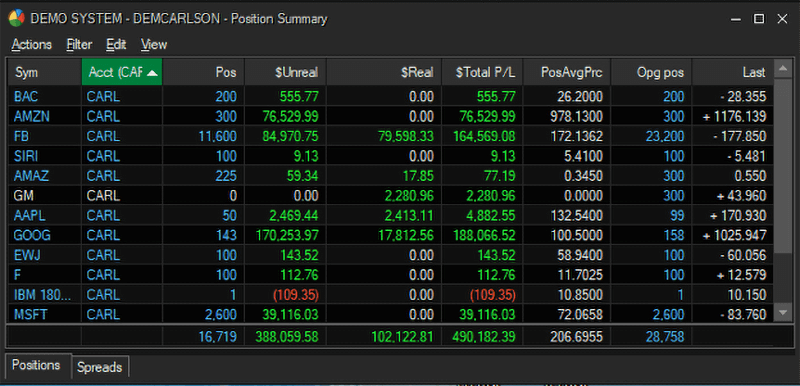
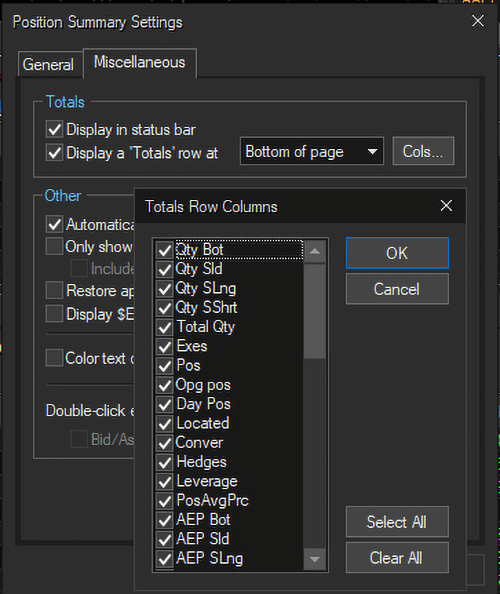
Go to View – Settings – Miscellaneous Tab and check “Display a Totals Row”. Position it at the top or bottom of the page, and then select which Columns you wish to see totaled:
We look forward to learning more about your trading needs.

What Doesn't Change: Pre-Trade Risk Controls, 15c3-5 and What's Next
Blog Series: The 611 Question | Part ...

Preparing for a Post-611 World: Transition, Routing, and the Patchwork
Blog Series: The 611 Question | Part ...

Sterling Risk & Margin Wins Best Margining Solution at Risk Asia Awards 2026
Award recognizes Sterling’s real-time margin management for brokerages and trading firms ...

When 611 Is Gone, Best Execution Is the Safeguard
Blog Series: The 611 Question | Part ...
